Explorip
Download it from : https://github.com/FilRip/Explorip/releases/latest
Windows Shell/Explorer Replacement. All languages supported.
100% in C# (and PInvoke) and User mode (no administrator privilege required) and fully customizable
Look at Settings in Wiki : https://github.com/FilRip/Explorip/wiki/Settings for a short description (will be more fill later)
Example with a classic Windows 11

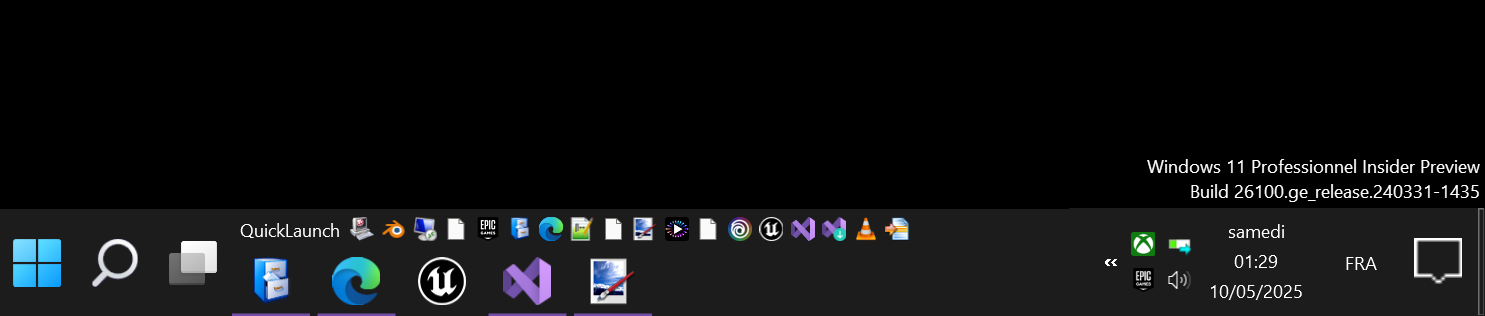
And an example with Explorip (and a custom toolbar called QuickLaunch in Win10)
Or

Explorer
Launch Explorip without command line arguments (or a path to a folder) to use the new file explorer
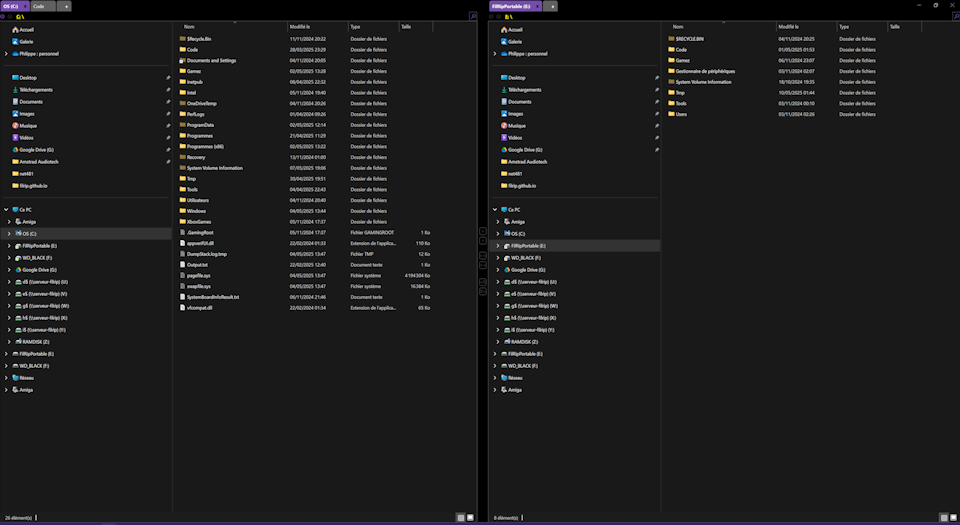
You can manage explorer with tabs, and 2 explorer in same screen to more easily copy/paste between them.
You can open command prompt or powershell too in any tabs. Same for a registry editor, and to embed any other window in a tab of Explorip (except window of UWP application, like calc.exe)
Sample of Explorip explorer with two tabs :
Cut/Copy/Paste files/folders interceptor/replacer
Launch explorip with “useowncopier” in command line argument to intercept copy/paste with an icon in notification zone (like SuperCopier/UltraCopier/TeraCopy/…)
Taskbar
Launch Explorip with “taskbars” as command line arguments to use the new Taskbar Manager
Ideal to Windows 11 users to have a taskbar like Windows 10 and with toolbar
Support multi virtual desktop too
Desktop
Launch Explorip with “desktops” as command line arguments to use the new desktop background
StartMenu
Replace StartMenu of Windows by the one integrate in Explorip. Model take from Windows 10
Plugins
You can make plugins. Plugins will be available like toolbar, to add custom control to taskbar. There is an example in this repository of a “MP3 Player” plugins with playlist
Tested under
- Windows 10 22H2 build 19041 (no more tested since v1.2 but still should work)
- Windows 11 23H2 build 22631
- Windows 11 25H2 build 26200